now u can see a video story about reuters photographer
Tuesday, January 20, 2009

Wednesday, December 3, 2008
White Balance
Color Temperature
Most light sources are not 100% pure white but have a certain "color temperature", expressed in Kelvin. For instance, the midday sunlight will be much closer to white than the more yellow early morning or late afternoon sunlight. This diagram gives rough averages of some typical light sources.
Type of Light
Color Temperature in K
Candle Flame
1,500
Incandescent
3,000
Sunrise, Sunset
3,500
Midday Sun, Flash
5,500
Bright Sun, Clear Sky
6,000
Cloudy Sky, Shade
7,000
Blue Sky
9,000
Latest News
Just posted! Tamron 18-270mm VC lens review
Nikon unveils 24.5MP D3X digital SLR
Budget Compact Camera Group Test
Panasonic - new flash and firmware for DMC-LX3
Just Posted! Canon Powershot G10 review
Adobe updates Camera Raw for CS4
Canon US video and printer rebate glitch
Kodak challenges Samsung and LG on patents
Sony develops CMOS sensor for phones
Just posted! Pentax 50mm F1.4 lens review
Sigma buys sensor developer Foveon
Samsung Techwin to spin-out camera division
Sigma DP1 Firmware Update
Phase One releases Capture One v4.5.1
dpreview.com blog
White Balance
White BalanceBy Vincent Bockaert
Color TemperatureMost light sources are not 100% pure white but have a certain "color temperature", expressed in Kelvin. For instance, the midday sunlight will be much closer to white than the more yellow early morning or late afternoon sunlight. This diagram gives rough averages of some typical light sources.
Type of Light
Color Temperature in K
Candle Flame
1,500
Incandescent
3,000
Sunrise, Sunset
3,500
Midday Sun, Flash
5,500
Bright Sun, Clear Sky
6,000
Cloudy Sky, Shade
7,000
Blue Sky
9,000
White Balance
Normally our eyes compensate for lighting conditions with different color temperatures. A digital camera needs to find a reference point which represents white. It will then calculate all the other colors based on this white point. For instance, if a halogen light illuminates a white wall, the wall will have a yellow cast, while in fact it should be white. So if the camera knows the wall is supposed to be white, it will then compensate all the other colors in the scene accordingly.
Most digital cameras feature automatic white balance whereby the camera looks at the overall color of the image and calculates the best-fit white balance. However these systems are often fooled especially if the scene is dominated by one color, say green, or if there is no natural white present in the scene as show in this example.
The auto white balance was unable to find a white reference, resulting in dull and artificial colors.
The auto white balance got it right this time in a very similar scene because it could use the clouds as its white reference.
Most digital cameras also allow you to choose a white balance manually, typically sunlight, cloudy, fluorescent, incandescent etc. Prosumer and SLR digital cameras allow you to define your own white balance reference. Before making the actual shot, you can focus at an area in the scene which should be white or neutral gray, or at a white or gray target card. The camera will then use this reference when making the actual shot.
Most light sources are not 100% pure white but have a certain "color temperature", expressed in Kelvin. For instance, the midday sunlight will be much closer to white than the more yellow early morning or late afternoon sunlight. This diagram gives rough averages of some typical light sources.
Type of Light
Color Temperature in K
Candle Flame
1,500
Incandescent
3,000
Sunrise, Sunset
3,500
Midday Sun, Flash
5,500
Bright Sun, Clear Sky
6,000
Cloudy Sky, Shade
7,000
Blue Sky
9,000
Latest News
Just posted! Tamron 18-270mm VC lens review
Nikon unveils 24.5MP D3X digital SLR
Budget Compact Camera Group Test
Panasonic - new flash and firmware for DMC-LX3
Just Posted! Canon Powershot G10 review
Adobe updates Camera Raw for CS4
Canon US video and printer rebate glitch
Kodak challenges Samsung and LG on patents
Sony develops CMOS sensor for phones
Just posted! Pentax 50mm F1.4 lens review
Sigma buys sensor developer Foveon
Samsung Techwin to spin-out camera division
Sigma DP1 Firmware Update
Phase One releases Capture One v4.5.1
dpreview.com blog
White Balance
White BalanceBy Vincent Bockaert
Color TemperatureMost light sources are not 100% pure white but have a certain "color temperature", expressed in Kelvin. For instance, the midday sunlight will be much closer to white than the more yellow early morning or late afternoon sunlight. This diagram gives rough averages of some typical light sources.
Type of Light
Color Temperature in K
Candle Flame
1,500
Incandescent
3,000
Sunrise, Sunset
3,500
Midday Sun, Flash
5,500
Bright Sun, Clear Sky
6,000
Cloudy Sky, Shade
7,000
Blue Sky
9,000
White Balance
Normally our eyes compensate for lighting conditions with different color temperatures. A digital camera needs to find a reference point which represents white. It will then calculate all the other colors based on this white point. For instance, if a halogen light illuminates a white wall, the wall will have a yellow cast, while in fact it should be white. So if the camera knows the wall is supposed to be white, it will then compensate all the other colors in the scene accordingly.
Most digital cameras feature automatic white balance whereby the camera looks at the overall color of the image and calculates the best-fit white balance. However these systems are often fooled especially if the scene is dominated by one color, say green, or if there is no natural white present in the scene as show in this example.
The auto white balance was unable to find a white reference, resulting in dull and artificial colors.
The auto white balance got it right this time in a very similar scene because it could use the clouds as its white reference.
Most digital cameras also allow you to choose a white balance manually, typically sunlight, cloudy, fluorescent, incandescent etc. Prosumer and SLR digital cameras allow you to define your own white balance reference. Before making the actual shot, you can focus at an area in the scene which should be white or neutral gray, or at a white or gray target card. The camera will then use this reference when making the actual shot.
Tuesday, December 2, 2008
TIFF
TIFF (Tagged Image File Format) is a universal image format that is compatible with most image editing and viewing programs. It can be compressed in a lossless way, internally with LZW or Zip compression, or externally with programs like WinZip. While JPEG only supports 8 bits/channel single layer RGB images, TIFF also supports 16 bits/channel multi-layer CMYK images in PC and Macintosh format. TIFF is therefore widely used as a final format in the printing and publishing industry.
Many digital cameras offer TIFF output as an uncompressed alternative to compressed JPEG. Due to space and processing constraints only the 8 bits/channel version is used in digital cameras. Higher-end scanners offer a 16 bits/channel TIFF option. If available, RAW is a much better alternative for digital cameras than TIFF.
Many digital cameras offer TIFF output as an uncompressed alternative to compressed JPEG. Due to space and processing constraints only the 8 bits/channel version is used in digital cameras. Higher-end scanners offer a 16 bits/channel TIFF option. If available, RAW is a much better alternative for digital cameras than TIFF.
Wednesday, November 26, 2008
Menghasilkan Gambar HDR....
Gambar HDR ialah hasil kombinasi gambar yang berlainan exposure bagi menghasilkan sekeping gambar everage exposure, selalunya gambar HDR ini dikaitkan dengan gambar pemandangan sama ada waktu senja, subuh, malam dan sebagainya. Tidak salah juga menghasilkan gambar HDR.Di bawah adalah beberapa keping gambar hasil dari saya....
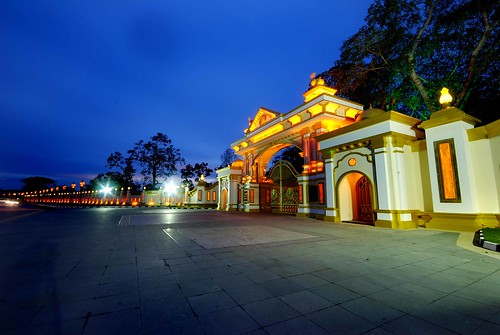 Copyright © mzaidi.com
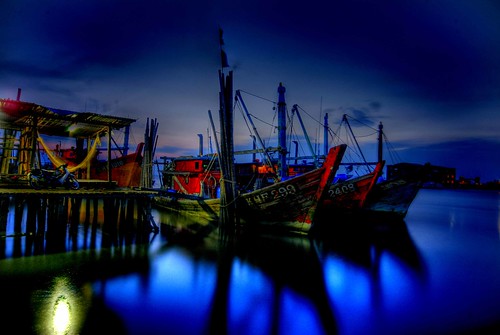 Copyright © mzaidi.com
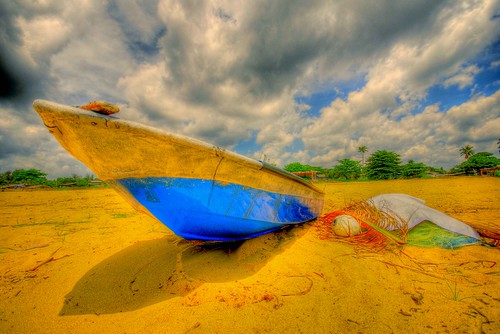 Copyright © mzaidi.com
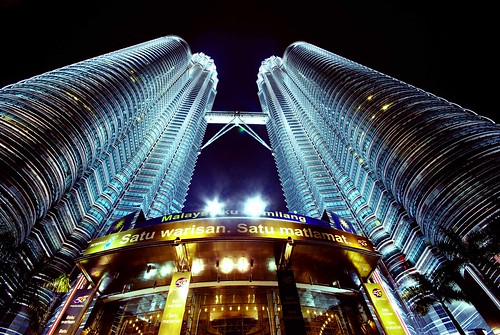 Copyright © mzaidi.com
 Copyright © mzaidi.com
regard,
Mohd Zaidi Bin Desa
Principal Photographer
Mzaidi.com
+60195112662
edphotographykedah@gmail.com

Copyright © mzaidi.com Copyright © mzaidi.com Copyright © mzaidi.com Copyright © mzaidi.com Copyright © mzaidi.comregard,
Mohd Zaidi Bin Desa
Principal Photographer
Mzaidi.com
+60195112662
edphotographykedah@gmail.com
Monday, December 3, 2007
Photographic filters
Photographic filters have been in use for a long time. They were required for special effects or to enhance the contrast of some colors. They were also used for white balance.
For example, a film set for daylight color temperature, would have produced yellowish photos when taken inside, with incandescent light bulbs lighting the scene. To compensate, a blue filter had to be used, to get the right colors.
The major advantage of digital cameras is the fact that you can adjust the white balance of a scene electronically, without the use of a color filter. As far as the image effects that could be obtained with some filters (like blurring the image, changing color hue for specific areas of a photograph, etc.) there are better ways of getting them onto a photo.
Very cheap image software can produce more effects on a photograph than all the filters in the world combined. With a little bit of imagination, using software to get the effects you want is the best way to go.
The only filter a digital camera actually needs is a polarizer.
Polarizers come in two varieties:Linear polarizers Circular polarizers
Each has the same effect but circular polarizers are more expensive. Digital cameras can use both (linear and circular) polarizers.
Polarizers produce deeper colored blue skies, minimize light reflections from glass and water and reduces glare from non-metallic surfaces. They also provide good color saturation. Can be used in extremely bright light situations to reduce the amount of light entering the camera; this enables more selective depth of field control.
For example, a film set for daylight color temperature, would have produced yellowish photos when taken inside, with incandescent light bulbs lighting the scene. To compensate, a blue filter had to be used, to get the right colors.
The major advantage of digital cameras is the fact that you can adjust the white balance of a scene electronically, without the use of a color filter. As far as the image effects that could be obtained with some filters (like blurring the image, changing color hue for specific areas of a photograph, etc.) there are better ways of getting them onto a photo.
Very cheap image software can produce more effects on a photograph than all the filters in the world combined. With a little bit of imagination, using software to get the effects you want is the best way to go.
The only filter a digital camera actually needs is a polarizer.
Polarizers come in two varieties:Linear polarizers Circular polarizers
Each has the same effect but circular polarizers are more expensive. Digital cameras can use both (linear and circular) polarizers.
Polarizers produce deeper colored blue skies, minimize light reflections from glass and water and reduces glare from non-metallic surfaces. They also provide good color saturation. Can be used in extremely bright light situations to reduce the amount of light entering the camera; this enables more selective depth of field control.
Exposure Compensation
Exposure Compensation is a feature on a digital camera that allows you to adjust the shutter speed measured by its light meter. Usually, the range of adjustment goes from +2 to -2 EV in 1/3 steps.
Lets say that you point the camera at you subject and the meter says you need 1/250 sec. shutter speed at aperture 5.
If for whatever reason you select +1 exposure compensation, the shutter speed used by the camera will be 1/125 sec.
If you use -1 exposure compensation, the shutter speed will be 1/500 sec.
Every increment in exposure compensation (+2 +1 -1 -2) increases or decreases the amount of light going through the camera by a factor of 2.
Lets say that you point the camera at you subject and the meter says you need 1/250 sec. shutter speed at aperture 5.
If for whatever reason you select +1 exposure compensation, the shutter speed used by the camera will be 1/125 sec.
If you use -1 exposure compensation, the shutter speed will be 1/500 sec.
Every increment in exposure compensation (+2 +1 -1 -2) increases or decreases the amount of light going through the camera by a factor of 2.
White Balance
The white balance setting for a digital camera is very useful in dealing with various light conditions. The best way to understand this setting is to place a white sheet of paper in front of your camera and take a photograph.
If the image has a white sheet of paper in it, you're ok; but if the paper has a yellowish hue, you're in trouble.
To better understand this process, take a look at your lamp. It usually uses an incandescent bulb. If you look closely, you'll notice that the color of this particular source of light has a yellow hue. The digital camera amplifies this hue and you get a yellowish photograph.
So, before taking any photo, look around at your sources of light। Even if you are outdoors, there are white balance settings that will make your photo look a lot better.
Daylight white balance
Cloudy white balance
Tungsten white balance
Fluorescent white balance
Flash white balance
If the image has a white sheet of paper in it, you're ok; but if the paper has a yellowish hue, you're in trouble.
To better understand this process, take a look at your lamp. It usually uses an incandescent bulb. If you look closely, you'll notice that the color of this particular source of light has a yellow hue. The digital camera amplifies this hue and you get a yellowish photograph.
So, before taking any photo, look around at your sources of light। Even if you are outdoors, there are white balance settings that will make your photo look a lot better.
Daylight white balance
Cloudy white balance
Tungsten white balance
Fluorescent white balance
Flash white balance
Subscribe to:
Posts (Atom)